

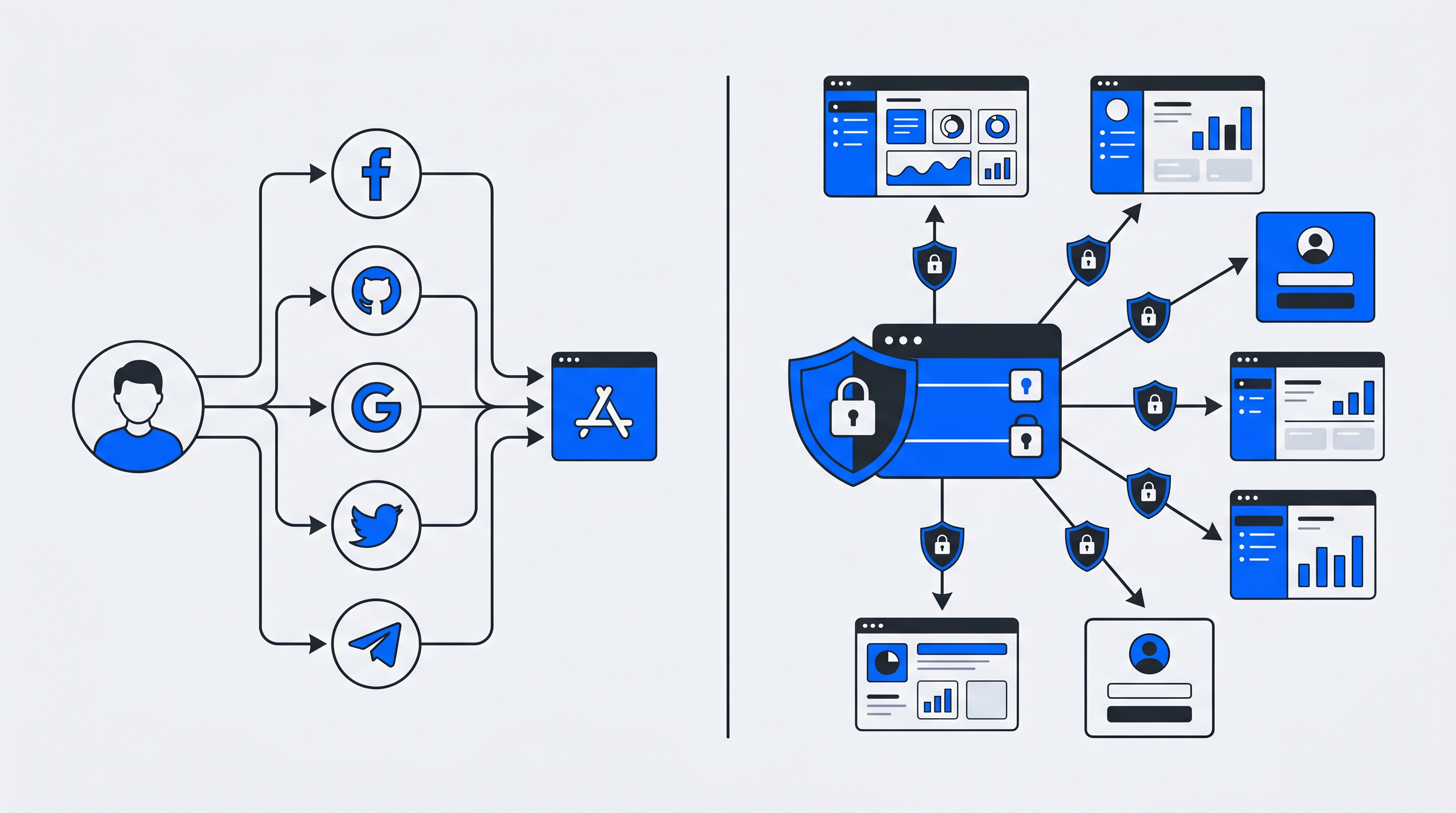
Social login and Single Sign-On (SSO) both promise to eliminate password fatigue—reported at high levels by 39% of Americans—but they solve different problems for different audiences. Social login lets consumers authenticate with existing accounts from Google or Facebook, while SSO gives organizations a unified identity layer across multiple applications.
Password fatigue is a real barrier to user engagement and conversion
The distinction matters because it affects who owns your user data, how much control you have over security policies, and whether you're building a first-party data asset or depending on third-party platforms. This guide breaks down how each approach works, when to use one over the other, and how to combine them for the best of both worlds.
What is social login?
Social login lets users sign into a new website or app using credentials they already have with a third-party platform like Google, Facebook, or Apple. Instead of filling out a registration form and creating yet another password, users click a button, confirm their identity with the social provider, and they're in. This approach is most common in consumer-facing applications where every extra form field can cost you a signup.
The important thing to understand here is that the identity provider—Google, Facebook, LinkedIn—owns and controls the user's identity data. Your application only receives what the provider decides to share, typically a name, email address, and profile picture. You're essentially borrowing someone else's authentication system rather than building your own.
How social login works
The technical foundation behind social login is OAuth 2.0, an authorization framework that allows secure access without exposing user passwords. Here's what happens when someone clicks "Sign in with Google":
- User clicks the login button: Your app redirects them to Google's authentication page
- User authenticates with Google: They enter their Google credentials directly on Google's site—your app never sees the password
- Google sends back a code: After successful authentication, Google redirects the user back to your app with an authorization code
- Your server exchanges the code: Your backend trades that code for an access token
- Session created: Your app verifies the token and creates a local session for the user
Throughout this entire flow, your application never touches the user's Google password. You only receive the information Google agrees to share.
Common social login providers
Different providers serve different audiences, so the right choice depends on who your users are:
- Google: The most widely adopted option, works well for nearly any consumer app
- Facebook: Popular for social platforms, media sites, and community-driven applications
- Apple: Increasingly important for mobile apps, especially where users care about privacy
- LinkedIn: Useful for professional platforms and B2B services where work identity matters
- Microsoft: Common in productivity-focused applications and mixed consumer/work environments
What is Single Sign-On (SSO)?
Single Sign-On (SSO) is an authentication method that lets users log in once and then access multiple connected applications without entering credentials again. Unlike social login, SSO typically operates within a controlled ecosystem—whether that's an enterprise environment, a membership platform, or a network of related services.
The key difference is who controls the identity. With SSO, an organization or platform runs its own identity provider (IdP) and maintains full control over user accounts, access policies, and authentication requirements. Users authenticate against this central IdP, which then grants access to connected service providers.
How Single Sign-On works
SSO depends on a trust relationship between the identity provider and each connected application. When a user tries to access an application, the app checks whether they already have a valid session with the IdP. If not, the user gets redirected to log in once. After that, they can move between connected applications without logging in again.
This "authenticate once, access many" model improves user experience while giving administrators centralized control. An IT team can enforce password policies, require multi-factor authentication (MFA), and revoke access instantly—all from one place.
Protocols behind SSO like SAML and OpenID Connect
Two protocols dominate the SSO landscape:
- SAML (Security Assertion Markup Language): An XML-based standard common in legacy enterprise systems. SAML works well for browser-based applications, though the XML format can be verbose and complex to implement.
- OpenID Connect (OIDC): A modern authentication layer built on OAuth 2.0. OIDC uses JSON-based tokens, making it lighter and better suited for mobile apps and API-driven architectures.
Many organizations now implement OIDC for new projects while maintaining SAML for existing integrations. Both accomplish the same goal—secure, federated authentication—but OIDC's simplicity has made it the preferred choice for modern applications.
Key differences between social login and Single Sign-On
Both approaches reduce password fatigue and simplify authentication, but they serve fundamentally different purposes. Here's a side-by-side comparison:
| Factor | Social Login | Single Sign-On (SSO) |
|---|---|---|
| Primary use case | Consumer apps, quick registration | Enterprise access, multi-service ecosystems |
| Identity provider | Third-party (Google, Facebook) | Organization-controlled IdP |
| Data ownership | Provider retains user data | Organization owns identity data |
| Security model | Depends on provider policies | Centralized IT control |
| User experience | One-click signup/login | Seamless navigation across connected apps |
Purpose and use case
Social login optimizes for conversion. When a potential customer lands on your e-commerce site, every form field creates friction. Offering "Sign in with Google" removes that barrier.
SSO optimizes for unified access. When an employee or member uses multiple connected services—email, project management, CRM, internal tools—SSO eliminates the hassle of managing separate credentials for each one.
Identity provider and data ownership
This distinction matters more than many organizations realize. With social login, Google or Facebook controls the user's identity. You receive whatever data they choose to share, subject to their policies. If a user deletes their social account, you lose that authentication path entirely.
With SSO, you—or your chosen identity platform—own the user data. You control what information gets collected, how it's stored, and how it's used. This ownership becomes particularly important for compliance, personalization, and building first-party data assets.
Security and trust model
Social login security depends entirely on the external provider. Google's security is excellent, but you have no control over their authentication policies. A compromised social account could expose access to every connected application—Verizon's 2025 DBIR research found stolen credentials in 22% of breaches.
SSO provides centralized security management. Administrators can enforce MFA, set session timeouts, revoke access instantly when someone leaves the organization, and maintain comprehensive audit trails. The tradeoff is that the IdP becomes a single point of failure—if it goes down, access to all connected applications is affected.
User experience and conversion impact
Both approaches improve user experience by reducing password burden—the average person now manages over 250 passwords—but in different contexts.
No wonder users abandon registrations — they're drowning in credentials
Social login excels at acquisition—it increases registration completion rates, particularly on mobile devices where typing is cumbersome.
SSO excels at retention and productivity. Users who access multiple services daily appreciate not having to authenticate repeatedly. For membership platforms or media brands with multiple properties, SSO creates a cohesive experience that reinforces the brand relationship.
Why social login and Single Sign-On are often confused
The confusion is understandable. From a user's perspective, both feel similar: click a button, authenticate somewhere, gain access. Both eliminate the need to remember another password.
The technical overlap adds to the confusion as well. Social login and SSO can both use OpenID Connect as their underlying protocol. The difference lies not in the technology but in who controls the identity provider and who owns the resulting user data.
Think of it this way: social login borrows identity from a third party, while SSO establishes identity within your own ecosystem.
Pros and cons of social login
Pros:
- Lower friction: Users skip registration forms, which can improve conversion rates
- Familiar experience: Users trust established providers and feel comfortable authenticating through them
- Faster implementation: Pre-built SDKs and integrations make social login relatively quick to deploy
Cons:
- Data dependency: Third parties control user data, limiting what you can collect and how you can use it
- Privacy concerns: Some users hesitate to connect social profiles to other services
- Platform risk: Changes to provider APIs or policies directly affect your authentication
Pros and cons of Single Sign-On
Pros:
- Centralized control: Administrators manage access policies and security settings in one place
- Improved security: Easier to enforce MFA, monitor access patterns, and revoke credentials
- Better user experience: One login grants access to all connected applications
Cons:
- Implementation complexity: Requires setting up an identity provider and integrating each connected service
- Single point of failure: If the IdP experiences downtime, access to all connected applications is affected
- Cost considerations: Enterprise SSO solutions often require significant investment
When to use social login vs Single Sign-On
The right choice depends on your audience, your data strategy, and your technical requirements.
Scenarios where social login fits best
Social login makes sense for consumer-facing applications where signup friction directly impacts business outcomes. E-commerce sites, media platforms, community forums, and mobile apps all benefit from the reduced barrier to entry.
It's also appropriate when you don't need deep user data or when your users expect social login as a standard option.
Scenarios where Single Sign-On fits best
SSO becomes valuable when you operate multiple connected services and want users to move seamlessly between them. Sports clubs with ticketing, merchandise, and content platforms; media brands with multiple properties; membership organizations with various member benefits—all benefit from unified identity.
SSO is also the right choice when data ownership matters. If you're building first-party data assets, running personalized campaigns, or operating under strict compliance requirements, controlling your own identity infrastructure provides the foundation you need.
Can you combine social login with Single Sign-On?
Yes—and this hybrid approach often delivers the best of both worlds. Many organizations offer social login as a convenient entry point while routing those identities through a central SSO layer.
A user might authenticate via Google, but their identity is then managed within your own identity platform. You get the conversion benefits of social login while maintaining data ownership and centralized control. Whether someone signs up with Google, Facebook, or a traditional email and password, their identity converges into a single, organization-owned profile.
Platforms like Unidy enable this hybrid model by acting as a central identity hub that accepts multiple authentication methods while maintaining unified user profiles, consent management, and data synchronization across connected services.
How social login and SSO affect GDPR compliance and zero-party data
Authentication choices have direct implications for data privacy and compliance. With social login, user data flows through third-party providers. This can complicate GDPR data subject requests—if a user asks what data you hold, you may need to coordinate with the social provider.
With SSO and a central identity platform, you control the entire data relationship. You can implement transparent consent management, collect zero-party data directly (information users intentionally share, like preferences and interests), and respond to data subject requests without third-party dependencies. EU-hosted solutions provide additional compliance confidence for organizations operating under GDPR.
Best practices for implementing social login and Single Sign-On
1. Choose standards-based protocols like OpenID Connect and SAML
Proprietary authentication solutions create vendor lock-in and integration headaches. Standards-based protocols ensure interoperability, benefit from community security review, and provide flexibility as your needs evolve.
2. Centralize consent and user profile management
Whether you use social login, SSO, or both, maintain a single source of truth for user consent and profile data. This centralization supports compliance, enables personalization, and prevents the data fragmentation that undermines customer understanding.
3. Reduce dependency on third-party identity providers
Social login can be an excellent acquisition tool, but consider it an entry point rather than a permanent dependency. Encourage users to complete their profiles and build relationships that don't depend entirely on third-party platforms.
4. Plan for data synchronization across connected systems
Identity data is only valuable if it flows to the systems that need it. Ensure your authentication infrastructure integrates with CRMs, CDPs, and marketing tools through APIs and webhooks.
Choosing the right authentication strategy for your business
The decision between social login and SSO—or a combination of both—comes down to a few key factors: your audience, your data ownership goals, and your compliance requirements.
Consumer applications typically benefit from social login's low friction. Enterprise or membership environments favor SSO's unified access. And for many organizations with multiple digital touchpoints, a central identity platform that combines both approaches provides the foundation for excellent user experience and strategic data ownership.
Is single sign-on the same as social sign-on?
No. Single Sign-On refers to using one set of credentials to access multiple applications within a controlled ecosystem—typically managed by an organization or platform. Social sign-on specifically uses a third-party social platform like Google or Facebook as the identity provider. SSO implies organizational control; social sign-on implies third-party dependency.
Is social login more secure than traditional username and password login?
Social login can offer security advantages because it leverages the authentication infrastructure of major providers who invest heavily in security measures like fraud detection. However, it also introduces dependency on that provider's security practices and creates a situation where a compromised social account could expose access to multiple connected applications.
What is replacing SAML for enterprise authentication?
OpenID Connect (OIDC) is increasingly adopted as a modern alternative to SAML. Built on OAuth 2.0, OIDC uses simpler JSON-based tokens rather than SAML's verbose XML format. It offers better support for mobile applications and API-driven architectures while maintaining enterprise-grade security.
Can social login work without single sign-on?
Yes. Social login functions independently as an authentication method for individual applications. A user can sign into your app with Google without any SSO infrastructure in place. However, combining social login with an SSO layer allows organizations to unify user identities across multiple services—users get the convenience of social authentication while the organization maintains centralized identity management.
::
Single Sign-On for Clubs: Why Member Login, Shop, Ticketing, and Newsletter Belong Together
Single Sign-On (SSO) is an authentication method that allows users to access multiple, independent applications with one set of credentials—logging in once to reach everything from a member portal to a shop, ticketing system, and newsletter without re-entering passwords.
The Social Media Monetization Gap: Why Sports Clubs with Millions of Followers Own Almost No Fan Data
A typical Bundesliga club has between 2 and 5 million social media followers across Instagram, Facebook, TikTok, and X. Yet when you ask these same clubs how many fans they can actually contact directly, with consent, for marketing purposes—the number drops to a fraction. Often less than 100,000. Sometimes far less.