

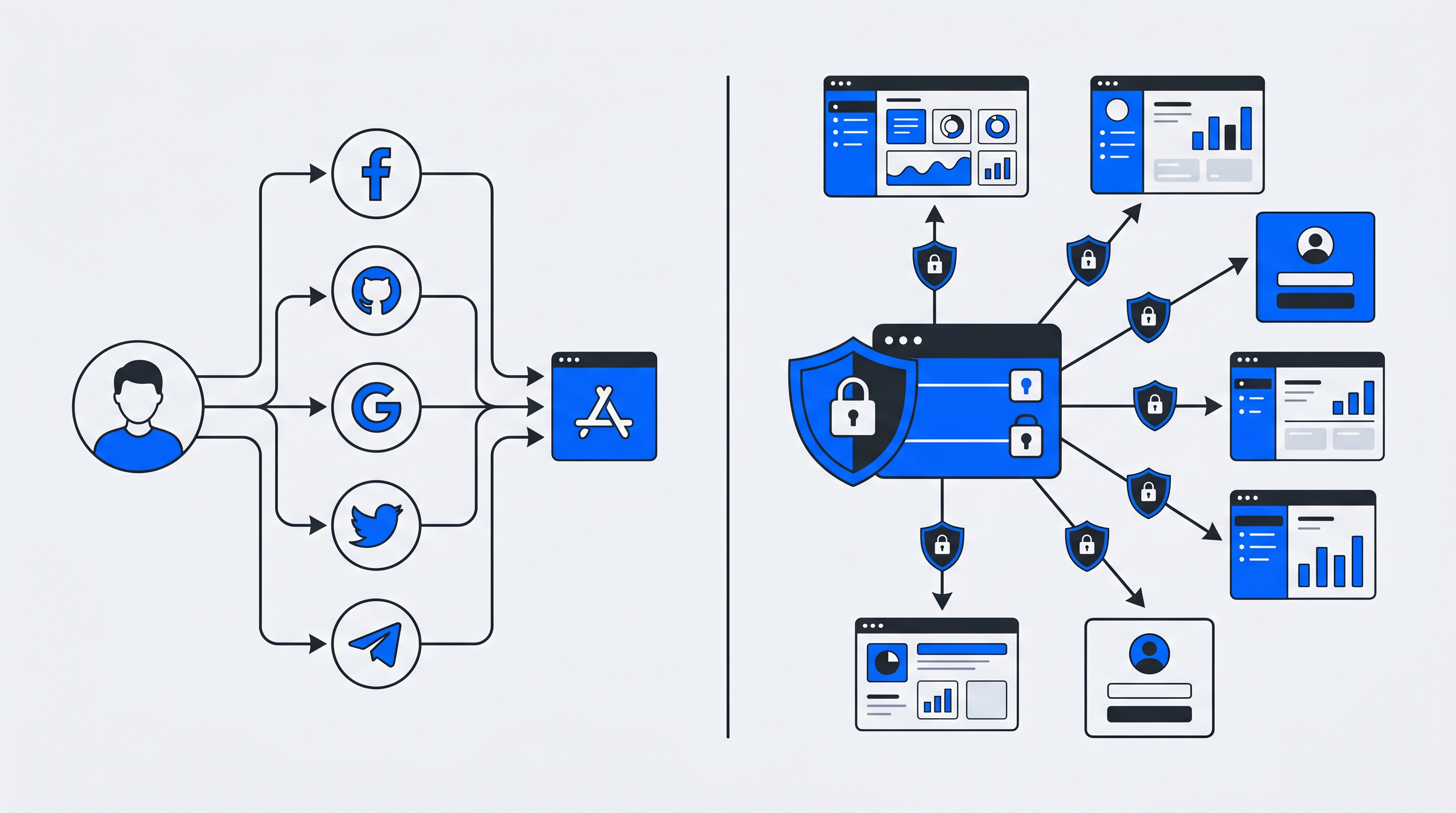
Social login and Single Sign-On (SSO) both promise to reduce password fatigue — which 39% of Americans report experiencing at a high level — but they solve different problems for different audiences.
Password fatigue is a real barrier to user engagement and conversion
Social login lets consumers authenticate using existing accounts from providers like Google, Facebook, or Apple. SSO, by contrast, gives organizations a unified identity layer across multiple applications and services.
That distinction matters because it affects who owns your user data, how much control you have over security policies, and whether you are building a first-party data asset or depending on third-party platforms. This guide explains how each approach works, when to choose one over the other, and how to combine both for the best of both worlds.
What is social login?
Social login allows users to sign up or log in to a new website or app using credentials they already have with a third-party platform such as Google, Facebook, Apple, or LinkedIn. Instead of filling out a registration form and creating yet another password, users click a button, confirm their identity with the social provider, and gain access.
This approach is especially common in consumer-facing apps where every extra form field can reduce signup conversion.
The key thing to understand is that the identity provider — Google, Facebook, Apple, LinkedIn, and others — owns and controls the user's identity data. Your application only receives the information the provider chooses to share, usually something like a name, email address, and profile picture. In other words, you are borrowing someone else’s authentication system rather than owning your own identity layer.
How social login works
Social login is typically powered by OAuth 2.0, an authorization framework that enables secure delegated access without exposing user passwords to your application.
Here’s what happens when someone clicks “Continue with Google”:
- The user clicks the social login button: Your app redirects them to Google’s authentication page.
- The user authenticates with Google: They enter their Google credentials directly on Google’s site, so your app never sees the password.
- Google sends back an authorization code: After successful authentication, Google redirects the user back to your application.
- Your backend exchanges the code for a token: Your server requests an access token or identity token from Google.
- A local session is created: Your app validates the token and creates a session for the user.
Throughout the process, your application never handles the social provider’s password directly. It only receives the identity claims and permissions the provider allows.
Common social login providers
Different providers make sense for different audiences:
- Google: The most widely used option, suitable for most consumer apps
- Facebook: Common for social platforms, media sites, and community-driven products
- Apple: Especially important for mobile apps and privacy-conscious users
- LinkedIn: Useful for professional networks, B2B products, and work-related identity
- Microsoft: Common in productivity tools and environments where personal and work identities overlap
What is Single Sign-On (SSO)?
Single Sign-On (SSO) is an authentication method that lets users log in once and then access multiple connected applications without re-entering credentials each time.
Unlike social login, SSO usually operates inside a controlled ecosystem — such as an enterprise, a membership platform, a media network, or a group of connected digital services.
The defining difference is control. With SSO, an organization operates or selects its own identity provider (IdP) and keeps control over user accounts, access rules, authentication methods, and security policy enforcement. Users authenticate against that central IdP, which then grants access to connected service providers.
How SSO works
SSO relies on a trust relationship between the identity provider and each connected application.
When a user tries to access an application:
- The app checks whether the user already has a valid session with the identity provider
- If not, the user is redirected to the IdP to log in once
- After successful authentication, the IdP sends proof of identity back to the application
- The user can then move between connected applications without signing in again
This “authenticate once, access many” model improves the user experience while also giving administrators centralized control. An IT or platform team can enforce password policies, require multi-factor authentication (MFA), revoke access instantly, and maintain audit trails from one place.
Protocols behind SSO: SAML and OpenID Connect
Two protocols dominate the SSO landscape:
- SAML (Security Assertion Markup Language): An XML-based standard commonly used in older enterprise environments. SAML works well for browser-based enterprise applications but can be relatively heavy and complex to implement.
- OpenID Connect (OIDC): A modern authentication layer built on OAuth 2.0. OIDC uses JSON-based tokens, making it lighter and better suited for mobile apps and API-driven architectures.
Many organizations support both — SAML for legacy integrations and OIDC for newer applications. Both enable secure federated authentication, but OIDC has become the preferred choice for many modern systems.
Social login vs SSO: key differences
Both approaches reduce password fatigue and simplify authentication, but they serve fundamentally different goals.
| Factor | Social Login | Single Sign-On (SSO) |
|---|---|---|
| Primary use case | Consumer apps, fast registration | Enterprise access, multi-service ecosystems |
| Identity provider | Third-party provider like Google or Facebook | Organization-controlled IdP |
| Data ownership | Provider retains control over identity data | Organization owns and governs identity data |
| Security model | Depends on external provider policies | Centralized control by the organization |
| User experience | One-click signup or login | Seamless movement across connected apps |
1. Purpose and use case
Social login is optimized for conversion.
If someone lands on your ecommerce site, media subscription flow, or mobile app onboarding screen, every extra field creates friction. “Continue with Google” removes that friction and helps users get started faster.
SSO is optimized for unified access.
If employees, members, subscribers, or customers need to use several related tools or services — such as a CRM, help center, event portal, app, and content platform — SSO reduces the burden of managing separate credentials for each one.
2. Identity provider and data ownership
This difference is more strategic than many organizations first realize.
With social login, Google, Facebook, Apple, or another provider controls the user identity. You receive only the profile data they decide to share and only under their rules. If a provider changes policy or a user deletes their social account, your authentication path can be disrupted.
With SSO, you — or your chosen identity platform — control the identity layer. You decide what user information is collected, how it is stored, which policies apply, and how the data supports downstream systems.
That matters for compliance, personalization, customer intelligence, and the long-term value of first-party identity data.
3. Security and trust model
The security of social login depends heavily on the external provider. Google and Apple, for example, invest heavily in account security, but you do not control their authentication requirements or policy decisions.
A compromised social account can potentially expose access to multiple connected apps — and Verizon’s 2025 DBIR research found stolen credentials were involved in 22% of all breaches.
SSO provides centralized security management. Administrators can:
- enforce MFA
- set session timeouts
- revoke access immediately when a user leaves an organization
- monitor authentication activity
- maintain detailed audit logs
The tradeoff is that the identity provider becomes a critical dependency. If the IdP experiences downtime, users may lose access across all connected applications.
4. User experience and conversion impact
Both models improve the user experience by reducing password burden — the average person now manages more than 250 passwords.
No wonder users abandon registrations — they're drowning in credentials
But they improve UX in different contexts:
- Social login is strongest at the acquisition stage, where friction reduction directly improves registration completion rates, especially on mobile devices.
- SSO is strongest for retention, continuity, and productivity, where users benefit from not having to repeatedly authenticate across multiple services.
For platforms with several digital touchpoints, SSO can create a more cohesive brand experience.
Why social login and SSO are often confused
The confusion is understandable because, from the user’s point of view, both can feel similar. In both cases, a user clicks a button, authenticates somewhere, and gains access without creating another password.
There is also technical overlap. Social login and SSO can both use OpenID Connect under the hood. The difference is not the protocol itself, but who controls the identity provider and who owns the resulting user relationship and data.
A simple way to think about it:
- Social login borrows identity from a third party
- SSO establishes identity within your own ecosystem
Pros and cons of social login
Advantages
- Lower friction: Users skip long registration forms, which can improve conversion rates
- Familiar experience: Users already trust major providers and recognize the login flow
- Faster implementation: Prebuilt SDKs and integrations can make rollout relatively quick
Disadvantages
- Data dependency: Third parties control key identity data and limit what you can access
- Privacy concerns: Some users hesitate to connect social accounts to other services
- Platform risk: API or policy changes by the provider can directly affect your authentication flow
Pros and cons of SSO
Advantages
- Centralized control: Administrators manage access rules and security settings in one place
- Improved security: MFA enforcement, monitoring, and rapid deprovisioning are easier
- Better cross-product experience: One login gives users access across connected applications
Disadvantages
- Implementation complexity: You need an identity provider and integrations with each connected service
- Single point of failure: If the IdP goes down, access across the ecosystem may be interrupted
- Higher cost: Enterprise-grade SSO implementations may require more budget and resources
When to use social login vs SSO
The right choice depends on your users, your data strategy, and your technical environment.
Best-fit scenarios for social login
Social login is usually the best fit for consumer-oriented applications where signup friction directly affects business performance, including:
- ecommerce sites
- mobile apps
- media platforms
- online communities
- consumer subscriptions
It also makes sense when users expect social login as a standard convenience and when deep ownership of identity data is not your top priority.
Best-fit scenarios for SSO
SSO becomes especially valuable when you operate multiple connected services and want users to move between them seamlessly.
Examples include:
- enterprises with many internal applications
- media brands with multiple digital products
- sports organizations with ticketing, content, and merchandise services
- membership organizations offering several member benefits
- platforms that need a unified customer identity across touchpoints
SSO is also the better choice when data ownership matters. If you are building first-party data assets, supporting personalization, or operating under strict compliance requirements, controlling your identity infrastructure becomes strategically important.
Can you combine social login with SSO?
Yes — and in many cases, that is the strongest approach.
A hybrid model lets you offer social login as a convenient entry point while still routing users into a centralized identity system that you control.
For example, a user might authenticate with Google at signup, but their identity is then managed inside your own platform. That gives you:
- the conversion benefits of social login
- unified profiles across services
- centralized consent management
- greater data ownership
- more control over security and user lifecycle management
Whether someone signs up with Google, Facebook, Apple, or email, the resulting identity can be consolidated into a single organization-controlled profile.
Platforms like Unidy support this model by acting as a central identity hub that accepts multiple authentication methods while maintaining unified profiles, consent records, and synchronized identity data across connected systems.
How social login and SSO affect GDPR compliance and zero-party data
Your authentication model has direct implications for privacy, compliance, and data strategy.
With social login, user identity data flows through third-party platforms. That can make GDPR-related processes more complicated. If a user requests information about what data you store, you may need to account for data dependencies involving the social provider.
With SSO and a centralized identity platform, you control the relationship end to end. That makes it easier to:
- implement transparent consent management
- capture zero-party data directly from users
- respond to data subject requests
- maintain clear records of how identity data is stored and used
For organizations operating in Europe or under GDPR obligations, regionally hosted identity solutions can further strengthen compliance confidence.
Best practices for implementing social login and SSO
1. Use standards-based protocols like OIDC and SAML
Avoid proprietary authentication approaches where possible. Standards-based protocols improve interoperability, reduce lock-in, and benefit from broad security review.
2. Centralize consent and profile management
Whether you use social login, SSO, or both, maintain a single source of truth for user profiles and consent status. That improves compliance, personalization, and data quality.
3. Reduce overreliance on third-party identity providers
Social login is powerful for acquisition, but it should ideally be an entry point rather than your only identity strategy. Encourage users to build a durable relationship with your platform beyond the third-party account.
4. Plan for identity data synchronization
Identity data is only useful if it reaches the systems that need it. Make sure your authentication setup integrates with CRMs, CDPs, and marketing tools through APIs and webhooks.
Choosing the right authentication strategy for your business
The choice between social login and SSO — or a combination of both — ultimately comes down to a few core questions:
- Who are your users?
- Are you optimizing for signup conversion or cross-platform access?
- How important is first-party data ownership?
- What security and compliance requirements do you need to meet?
Consumer apps usually benefit from the low-friction convenience of social login. Enterprise and membership ecosystems usually benefit more from the unified access model of SSO.
For many organizations with multiple digital touchpoints, a central identity platform that combines both approaches offers the strongest foundation for user experience, security, and strategic data ownership. If you want to explore the broader identity landscape, you can also read more about CIAM.
Frequently asked questions about social login and SSO
Is Single Sign-On the same as social sign-on?
No. Single Sign-On means using one authenticated identity to access multiple connected applications within a controlled ecosystem, usually managed by an organization or platform. Social sign-on specifically uses a third-party social provider like Google or Facebook as the identity provider.
SSO implies organizational control. Social sign-on implies third-party dependency.
Is social login more secure than a traditional username and password login?
It can be, depending on the provider and implementation. Social login benefits from the security infrastructure of large providers that invest heavily in fraud detection, account protection, and MFA. But it also creates dependency on that provider’s security posture and means a compromised social account may affect multiple connected services.
What is replacing SAML in enterprise authentication?
OpenID Connect (OIDC) is increasingly used as a modern alternative to SAML. Because it is built on OAuth 2.0 and uses lightweight JSON-based tokens instead of XML, OIDC is often easier to work with for mobile apps and API-driven systems while still supporting enterprise-grade authentication.
Can social login work without SSO?
Yes. Social login can work as a standalone authentication method for a single application. A user can sign in with Google on your app even if you do not have an SSO system in place.
However, combining social login with an SSO layer helps organizations unify user identities across multiple services, giving users the convenience of social authentication while preserving centralized identity management.
Single Sign-On for Clubs: Why Member Login, Shop, Ticketing, and Newsletter Belong Together
Single Sign-On (SSO) ist eine Authentifizierungsmethode, die es Nutzern ermöglicht, mit einem einzigen Satz Zugangsdaten auf mehrere unabhängige Anwendungen zuzugreifen – einmal anmelden und anschließend alles vom Mitgliederportal über den Shop bis hin zum Ticketing-System und Newsletter nutzen, ohne Passwörter erneut eingeben zu müssen.
Die Social-Media-Monetarisierungslücke: Warum Sportvereine mit Millionen Followern kaum Fan-Daten besitzen
Ein typischer Bundesliga-Club hat zwischen 2 und 5 Millionen Social-Media-Follower auf Instagram, Facebook, TikTok und X. Doch wenn man dieselben Clubs fragt, wie viele Fans sie tatsächlich direkt kontaktieren können – mit Einwilligung, für Marketingzwecke – sinkt die Zahl auf einen Bruchteil. Oft weniger als 100.000. Manchmal weit weniger.