

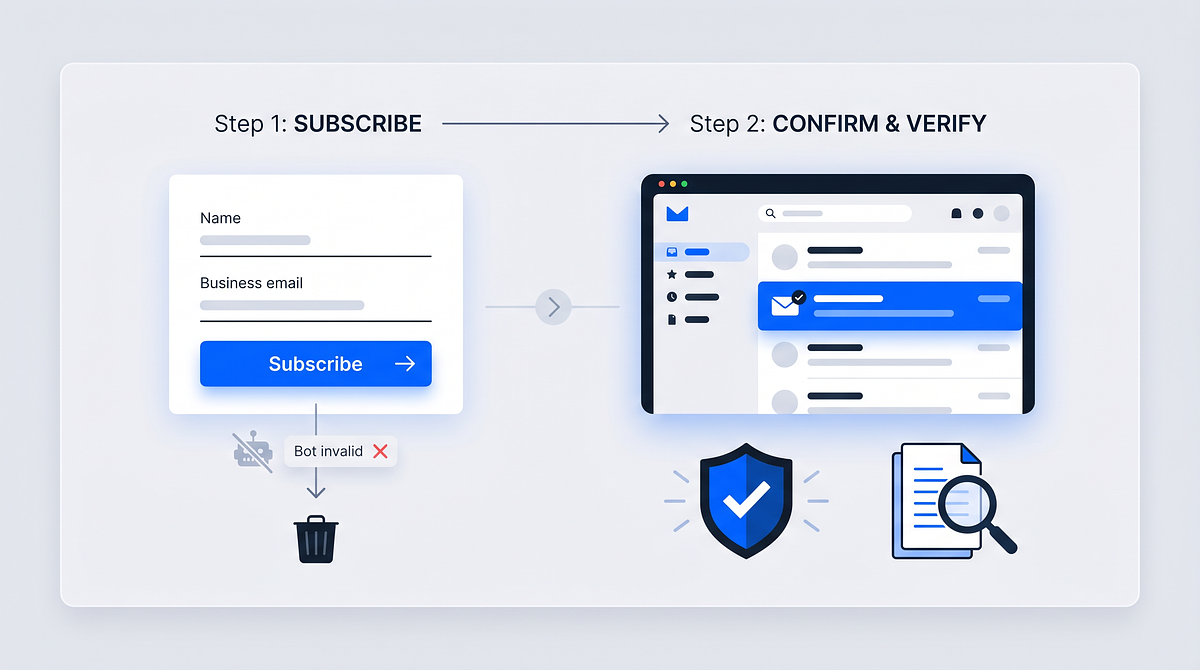
A newsletter double opt-in is a two-step subscription process where someone signs up for your email list and then confirms their intent by clicking a verification link sent to their inbox. Until that confirmation happens, the subscription stays inactive.
This extra step filters out typos, bots, and fake addresses before they ever reach your list, while creating a documented record of consent. The following guide covers how the process works, when to use it, and how to implement it as part of a broader consent management strategy.
What is newsletter double opt-in
Double opt-in is a two-step email subscription process where a user verifies their email address by clicking a confirmation link before being added to your mailing list. The first step happens when someone fills out your signup form. The second step happens when they open the confirmation email and click the verification link.
Until that click occurs, the subscription stays inactive. This extra step filters out typos, fake addresses, and bot signups before they ever reach your list.
Single opt-in, by contrast, adds subscribers the moment they submit the form. There's no verification, no confirmation email, and no proof the address belongs to the person who entered it.
So why does the extra step matter? Double opt-in confirms three things at once: the email address is real, it belongs to the person who signed up, and that person actually wants to receive your emails.
How the double opt-in process works
The sequence is straightforward, though each step serves a specific purpose in building a clean, compliant subscriber list.
1. Visitor submits the signup form
A visitor enters their email address into your newsletter form, along with any other fields you collect (name, preferences, etc.). At this point, nothing happens on the email side. The system simply records the submission as pending and waits for verification.
2. System sends a confirmation email
Within seconds, an automated email arrives in the visitor's inbox. This message contains a unique confirmation link and clearly states what the subscriber is confirming, for example: "Confirm your subscription to [Newsletter Name]."
The confirmation email is not a marketing message. It has one job: getting the subscriber to verify their intent.
3. Subscriber clicks the confirmation link
The subscriber opens the email and clicks the confirmation link or button. This single action creates a timestamped record of consent, which your system stores for compliance purposes.
4. System records the opt-in and activates the subscription
Only after the click does the subscription become active. Your system logs the confirmation timestamp, the subscriber's email address, and typically their IP address. This record becomes your audit trail for GDPR and other privacy regulations.
Single opt-in vs double opt-in
The choice between single and double opt-in depends on what you're optimizing for. Here's a direct comparison:
| Factor | Single Opt-In | Double Opt-In |
|---|---|---|
| Steps required | One (form submission only) | Two (form + email confirmation) |
| Email verification | None | Yes |
| List growth speed | Faster | Slower |
| List quality | Lower (may include typos, bots) | Higher (verified addresses only) |
| GDPR compliance evidence | Weaker | Stronger (documented consent) |
| Engagement rates | Typically lower | Typically higher |
Single opt-in works when speed matters more than precision, for example during a short promotional campaign where you plan to clean the list afterward. Double opt-in fits better when you're building a long-term subscriber base and want every address to represent a real, interested person.
Why newsletter double opt-in matters
The extra confirmation step delivers measurable benefits across deliverability, engagement, and compliance.
Higher email deliverability and sender reputation
Email service providers (ESPs) track how often your messages bounce or get marked as spam. Confirmed subscribers reduce bounce rates — verified opt-in lists consistently achieve bounce rates well under 1% — because every address on your list has already received and responded to at least one email.
Over time, consistent delivery to verified addresses improves how ESPs score your sending domain. A better sender reputation means more of your emails land in the inbox rather than the spam folder.
Cleaner lists and stronger engagement
Double opt-in filters out fake addresses, typos, and bot signups before they ever reach your list. Subscribers who complete the confirmation step have already demonstrated intent, which typically translates to higher open rates, click rates, and conversions.
Verified zero-party and first-party data
Zero-party data refers to information subscribers intentionally share with you, like preferences or interests. First-party data is information you collect directly through your own channels.
When a subscriber confirms via double opt-in, you know this data is tied to a real, consenting individual. That verification makes your data more reliable for segmentation and personalization.
Documented consent for audits
The confirmation click creates a timestamped record that includes the subscriber's email address, the date and time of confirmation, and often their IP address. This documentation is valuable during compliance audits or when responding to data subject access requests under GDPR.
Is double opt-in required by GDPR and other email laws
GDPR does not explicitly mandate double opt-in. However, it does require consent that is "freely given, specific, informed, and unambiguous." Double opt-in provides stronger documentation of that consent than single opt-in.
Here's how different regulations approach the question:
- GDPR (EU): Not explicitly required, but double opt-in provides clearer proof of consent
- German market practice: Double opt-in is treated as the standard due to stricter interpretation of GDPR
- CAN-SPAM (US): Does not require double opt-in, but it helps maintain list hygiene
- CASL (Canada): Requires express consent; double opt-in strengthens documentation
If you have subscribers in the EU, particularly in Germany, double opt-in is widely considered best practice even though it's not technically mandatory — cumulative GDPR fines exceed €7.1 billion according to DLA Piper, reinforcing why documented consent matters.
When to use double opt-in for your newsletter
Double opt-in is most valuable in specific scenarios:
- When GDPR compliance is a priority: Organizations with EU subscribers benefit from stronger consent records
- When list quality matters more than volume: Focus on engaged subscribers rather than raw numbers
- When you have multiple signup touchpoints: Consolidating consent from forms across websites, apps, and events
- When migrating or merging subscriber lists: Re-confirming consent during data migration ensures only active, willing subscribers carry over
How to set up newsletter double opt-in
Implementation involves four key steps, each focused on a specific part of the subscriber journey.
Step 1. Configure the signup form and data fields
Decide which fields to include on your form. Email is essential; name and preferences are optional but useful for personalization. Include a clear consent statement before the submit button so subscribers know what they're signing up for.
Step 2. Build the confirmation email
Your confirmation email needs a clear subject line (for example, "Please confirm your subscription"), a brief explanation of what the subscriber is confirming, and a prominent confirmation button or link. Keep the design consistent with your brand so recipients recognize and trust the message.
Step 3. Set up the confirmation landing page
After clicking the confirmation link, subscribers land on a page that confirms their subscription is active. Use this page to set expectations: welcome them, explain what they'll receive, and suggest a next step like checking their inbox for the first newsletter.
Step 4. Sync opt-in status to your CRM and ESP
Confirmed opt-in status needs to flow to your Customer Relationship Management (CRM) system, Customer Data Platform (CDP), or Email Service Provider (ESP). Centralized consent records enable consistent data across systems and support audit trails when you need to demonstrate compliance.
Best practices for the confirmation email
The confirmation email is where subscribers either complete the process or abandon it. A few design choices can make a significant difference in confirmation rates:
- Use a clear, action-oriented subject line: Example: "Please confirm your subscription to [Newsletter Name]"
- Keep the message short: One clear call to action, no competing links
- Make the confirmation button prominent: Use contrasting colors and direct text like "Confirm My Subscription"
- Set expectations: Briefly describe what subscribers will receive and how often
- Include sender identification: Display your brand name and logo so recipients recognize the email
- Add a fallback link: Include a text link in case the button does not render properly
Common double opt-in challenges and how to fix them
Even well-designed double opt-in flows encounter friction. Here are the most common issues and practical solutions.
Low confirmation rates
Some subscribers abandon the process before confirming. This often happens when the confirmation email arrives too slowly or the subject line doesn't grab attention.
To address this, send the confirmation email immediately after form submission. Use a compelling subject line that clearly states the action required. Consider sending a single reminder email if confirmation doesn't happen within 24 hours.
Confirmation emails landing in spam
Aggressive spam filters sometimes catch confirmation emails, especially from new sending domains or domains without proper authentication.
Authenticating your sending domain with SPF, DKIM, and DMARC records helps — unauthenticated senders see inbox placement drop to 44% compared to 89% for authenticated domains.
Avoiding spam-trigger words in the subject line also reduces filtering. On your thank-you page, asking subscribers to check their spam folder if they don't see the confirmation email within a few minutes can recover otherwise lost signups.
Fragmented consent across multiple touchpoints
When newsletter signups come from websites, apps, events, and partner channels, consent records can end up scattered across different systems.
Centralizing consent management in a single identity layer that syncs opt-in status across all connected systems solves this problem. Every touchpoint then feeds into one source of truth.
Making double opt-in part of your central identity and consent layer
Double opt-in works best when it's part of a broader consent and identity infrastructure rather than an isolated email setting.
A single consent cockpit allows users to manage their preferences across all touchpoints, including newsletter subscriptions, account settings, and app notifications. When confirmed opt-ins sync automatically with CRMs, CDPs, and marketing tools via APIs and webhooks, you eliminate manual data transfers and reduce compliance risk.
Platforms supporting OpenID Connect and SAML standards can unify login, consent, and data collection into one flow. A subscriber who confirms their newsletter signup can also create an account, set preferences, and manage their data in one place.
Unidy provides this type of central identity and consent layer, enabling organizations to manage newsletter opt-ins alongside account authentication and GDPR-compliant data handling.
Read more about consent management
Frequently asked questions about newsletter double opt-in
How long should subscribers have to confirm their email address?
Most organizations allow between 24 and 72 hours for confirmation. After that window, unconfirmed signups are typically removed or sent a single reminder before deletion.
What happens if a subscriber never confirms the double opt-in request?
Unconfirmed subscribers remain in a pending state and do not receive marketing emails. After a defined period, they're usually deleted from the system or flagged for a final reminder.
Does double opt-in apply when migrating an existing newsletter list to a new platform?
If subscribers originally gave consent under different terms or the original consent records are incomplete, re-confirming via double opt-in during migration is recommended to ensure valid, documented consent.
Can the double opt-in process be used for SMS or push notification signups?
Yes, double opt-in can apply to any channel requiring explicit consent. For SMS, a confirmation code sent via text serves the same verification purpose as an email link.
How do you prove newsletter consent during a GDPR audit?
Auditors typically expect a timestamped record of the confirmation action, including the subscriber's email address, IP address, date and time, and the specific consent statement they agreed to.
[Best of Breed vs. Monolithic Systems
When you are looking for a software infrastructure that meets your company's needs, the terms "best of breed" and "monolithic" are used regularly. We therefore think it is useful to explain these terms in more detail, as it can be difficult to determine exactly what they mean and how they can work for your company.](https://www.unidy.io/blog/best-of-breed-vs-monolithic-systems-finding-the-best-software-solution-philosophy)
Top Membership Management Software Solutions: 2026 Comparison Guide
Managing members across spreadsheets, disconnected tools, and manual renewal tracking works—until it doesn't. The moment your organization grows beyond a few dozen members, the cracks start showing: missed renewals, duplicate records, and members frustrated by clunky experiences.
Newsletter Subscription Management Best Practices
A growing subscriber list means nothing if half the addresses bounce and the other half never open your emails. The real value of a newsletter lies not in its size but in how well you manage the people on it.